Dynomotion

Group: DynoMotion Message: 10011 From: moray_cuthill Date: 8/21/2014
Subject: KStep and Glass scales


Hi,


just looking for somebody to verify my figures, as I'm hoping to get glass scales mounted on my little probing machine and be up and running as quick as possible, so am asking in advance before things go well/totally belly up!


So having read the guide on the website, I come up with the following figures-

200 stepper motor steps x 16 KStep uSteps gives me 3200 pulses per 4 mm (ball screw pitch)

Now the scales I've bought are 1micron, so I should get one count per micron, which means I should get 4000 count per 4mm.


Now according to the website, my gain ratio should be steps/enconder count = 3200/4000 = 0.8


Does that sound right?


Thanks

Moray

Group: DynoMotion Message: 10012 From: Tom Kerekes Date: 8/21/2014
Subject: Re: KStep and Glass scales
Hi Moray,

Sounds right to me.

Regards
TK

Group: DynoMotion Message: 10015 From: Moray Cuthill Date: 8/22/2014
Subject: Re: KStep and Glass scales
Thanks for verifying that.
I managed to get the Y-axis setup tonight, with the only issue being I misread the bit about the raw units still being in uSteps, which I quickly realised after reconfiguring Mach to use the encoder resolution and ended up with the commanded and actual distances being out by a factor of 0.8.
 
One thing I do have a question about, is when I enable the axis, then turn the stepper a few steps by hand, after I've moved it the first step, no attempt is made to correct the position error. I can keep turning the stepper far enough until the axis disables because it's exceeded the max following error.
Is this normal for CL Step mode?
 
Thanks,
Moray


On Thu, Aug 21, 2014 at 6:04 PM, Tom Kerekes tk@... [DynoMotion] <DynoMotion@yahoogroups.com> wrote:
 

Hi Moray,

Sounds right to me.

Regards
TK

Group: DynoMotion Message: 10017 From: Tom Kerekes Date: 8/22/2014
Subject: Re: KStep and Glass scales
Hi Moray,

CL Step Mode should correct the error at least until the Max Output number of corrections steps has been made.  What are your PID gains and filter settings?

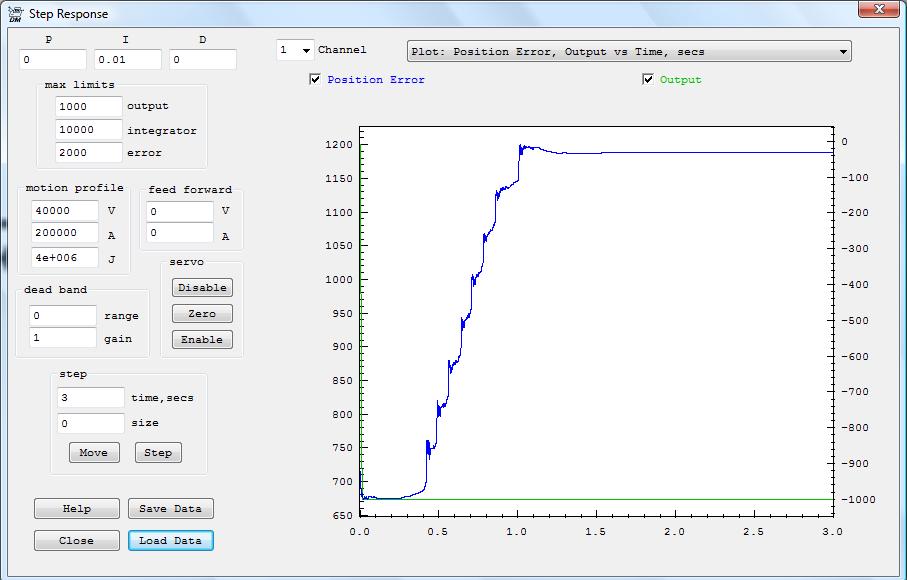
You might also do a "Move" of size zero and 3 seconds on the Step Response Screen to view a plot of how the position is corrected as you force it away.

Regards
TK

Group: DynoMotion Message: 10018 From: Moray Cuthill Date: 8/22/2014
Subject: Re: KStep and Glass scales
I never changed the settings from the defaults, as during commanded moves the following error was pretty good. Doing a move of 3000 resulted in less than 10, which I was happy enough with, so just left the defaults.
 
I did notice filter settings got added add some point, even though I was never in the screen for applying filters.
 
Here's a copy&paste from my init file for the Y-axis to see if anything stands out-
 
ch1->InputMode=ENCODER_MODE;
 ch1->OutputMode=CL_STEP_DIR_MODE;
 ch1->Vel=40000;
 ch1->Accel=200000;
 ch1->Jerk=4e+006;
 ch1->P=0;
 ch1->I=0.01;
 ch1->D=0;
 ch1->FFAccel=0;
 ch1->FFVel=0;
 ch1->MaxI=200;
 ch1->MaxErr=2000;
 ch1->MaxOutput=200;
 ch1->DeadBandGain=1;
 ch1->DeadBandRange=0;
 ch1->InputChan0=5;
 ch1->InputChan1=0;
 ch1->OutputChan0=9;
 ch1->OutputChan1=0;
 ch1->MasterAxis=-1;
 ch1->LimitSwitchOptions=0x100;
 ch1->LimitSwitchNegBit=0;
 ch1->LimitSwitchPosBit=0;
 ch1->SoftLimitPos=1e+030;
 ch1->SoftLimitNeg=-1e+030;
 ch1->InputGain0=0.8;
 ch1->InputGain1=1;
 ch1->InputOffset0=0;
 ch1->InputOffset1=0;
 ch1->OutputGain=1;
 ch1->OutputOffset=0;
 ch1->SlaveGain=1;
 ch1->BacklashMode=BACKLASH_OFF;
 ch1->BacklashAmount=0;
 ch1->BacklashRate=0;
 ch1->invDistPerCycle=1;
 ch1->Lead=0;
 ch1->MaxFollowingError=1000000000;
 ch1->StepperAmplitude=20;
 ch1->iir[0].B0=1;
 ch1->iir[0].B1=0;
 ch1->iir[0].B2=0;
 ch1->iir[0].A1=0;
 ch1->iir[0].A2=0;
 ch1->iir[1].B0=1;
 ch1->iir[1].B1=0;
 ch1->iir[1].B2=0;
 ch1->iir[1].A1=0;
 ch1->iir[1].A2=0;
 ch1->iir[2].B0=0.000769;
 ch1->iir[2].B1=0.001538;
 ch1->iir[2].B2=0.000769;
 ch1->iir[2].A1=1.92076;
 ch1->iir[2].A2=-0.923833;
 
 EnableAxisDest(1,0);
 
Only thing I notice is the max output is low, however I would of thought that would just result in a lower correction speed.
 
Thanks,
Moray


On Fri, Aug 22, 2014 at 11:59 PM, Tom Kerekes tk@... [DynoMotion] <DynoMotion@yahoogroups.com> wrote:
 

Hi Moray,

CL Step Mode should correct the error at least until the Max Output number of corrections steps has been made.  What are your PID gains and filter settings?

You might also do a "Move" of size zero and 3 seconds on the Step Response Screen to view a plot of how the position is corrected as you force it away.

Regards
TK

Group: DynoMotion Message: 10020 From: Tom Kerekes Date: 8/22/2014
Subject: Re: KStep and Glass scales
Hi Moray,

The small MaxOutput is the only issue I see as well.  200uSteps is about a dozen full steps so after that it would stop correcting.  Try a huge number and also a plot to figure out what is happening.

Regards
TH

Group: DynoMotion Message: 10048 From: Moray Cuthill Date: 8/27/2014
Subject: Re: KStep and Glass scales
Hi Tom,
 
I finally got the X-axis scale mounted and managed to try a few moves. The X-axis is also showing the same problem, so I suspect the issue is a setting somewhere.
 
I've attached a screen grab of a Position Error v. Output plot, which as you can see, the output increases to the limit as soon as the stepper is forced of position. Changing the maximum limits resulted in similar looking plots.
 
Here's the X-axis channel initialisation from the init.c file I'm using. I'm just using the supplied InitKstep3Axis.c example file, with just the channel settings changed.
 
ch0->InputMode=ENCODER_MODE;
 ch0->OutputMode=CL_STEP_DIR_MODE;
 ch0->Vel=40000;
 ch0->Accel=200000;
 ch0->Jerk=4e+006;
 ch0->P=0;
 ch0->I=0.01;
 ch0->D=0;
 ch0->FFAccel=0;
 ch0->FFVel=0;
 ch0->MaxI=10000;
 ch0->MaxErr=2000;
 ch0->MaxOutput=200;
 ch0->DeadBandGain=1;
 ch0->DeadBandRange=0;
 ch0->InputChan0=4;
 ch0->InputChan1=0;
 ch0->OutputChan0=8;
 ch0->OutputChan1=0;
 ch0->MasterAxis=-1;
 ch0->LimitSwitchOptions=0x0;
 ch0->SoftLimitPos=1e+030;
 ch0->SoftLimitNeg=-1e+030;
 ch0->InputGain0=0.8;
 ch0->InputGain1=1;
 ch0->InputOffset0=0;
 ch0->InputOffset1=0;
 ch0->OutputGain=-1;
 ch0->OutputOffset=0;
 ch0->SlaveGain=1;
 ch0->BacklashMode=BACKLASH_OFF;
 ch0->BacklashAmount=0;
 ch0->BacklashRate=0;
 ch0->invDistPerCycle=1;
 ch0->Lead=0;
 ch0->MaxFollowingError=2000;
 ch0->StepperAmplitude=20;
 ch0->iir[0].B0=1;
 ch0->iir[0].B1=0;
 ch0->iir[0].B2=0;
 ch0->iir[0].A1=0;
 ch0->iir[0].A2=0;
 ch0->iir[1].B0=1;
 ch0->iir[1].B1=0;
 ch0->iir[1].B2=0;
 ch0->iir[1].A1=0;
 ch0->iir[1].A2=0;
 ch0->iir[2].B0=0.000769;
 ch0->iir[2].B1=0.001538;
 ch0->iir[2].B2=0.000769;
 ch0->iir[2].A1=1.92076;
 ch0->iir[2].A2=-0.923833;
    EnableAxisDest(0,0);
 
One thing I have just realised, is the port/pin settings in Mach for the axis motors are currently set to valid KFlop IO numbers, however they don't appear to be linked to anything being used. They're all on port 1, with X using 2&6, Y 3&7, and Z 4&8.


On Sat, Aug 23, 2014 at 12:44 AM, Tom Kerekes tk@... [DynoMotion] <DynoMotion@yahoogroups.com> wrote:
 

Hi Moray,

The small MaxOutput is the only issue I see as well.  200uSteps is about a dozen full steps so after that it would stop correcting.  Try a huge number and also a plot to figure out what is happening.

Regards
TH

Group: DynoMotion Message: 10049 From: Moray Cuthill Date: 8/27/2014
Subject: Re: KStep and Glass scales
oops, hit send too soon!
 
Was also going to ask, now I'm running closed loop, am I correct in modifying the mach probe notify file, so that it's returning the Position instead of the Destination for the axis running closed loop?
 
i.e.
if (CS0_axis_x>=0) d[0]=chan[CS0_axis_x].Dest;
if (CS0_axis_y>=0) d[1]=chan[CS0_axis_y].Dest;
becomes
if (CS0_axis_x>=0) d[0]=chan[CS0_axis_x].Position;
if (CS0_axis_y>=0) d[1]=chan[CS0_axis_y].Position;
 
Thanks,
Moray


On Wed, Aug 27, 2014 at 10:46 PM, Moray Cuthill <moray.cuthill@...> wrote:
Hi Tom,
 
I finally got the X-axis scale mounted and managed to try a few moves. The X-axis is also showing the same problem, so I suspect the issue is a setting somewhere.
 
I've attached a screen grab of a Position Error v. Output plot, which as you can see, the output increases to the limit as soon as the stepper is forced of position. Changing the maximum limits resulted in similar looking plots.
 
Here's the X-axis channel initialisation from the init.c file I'm using. I'm just using the supplied InitKstep3Axis.c example file, with just the channel settings changed.
 
ch0->InputMode=ENCODER_MODE;
 ch0->OutputMode=CL_STEP_DIR_MODE;
 ch0->Vel=40000;
 ch0->Accel=200000;
 ch0->Jerk=4e+006;
 ch0->P=0;
 ch0->I=0.01;
 ch0->D=0;
 ch0->FFAccel=0;
 ch0->FFVel=0;
 ch0->MaxI=10000;
 ch0->MaxErr=2000;
 ch0->MaxOutput=200;
 ch0->DeadBandGain=1;
 ch0->DeadBandRange=0;
 ch0->InputChan0=4;
 ch0->InputChan1=0;
 ch0->OutputChan0=8;
 ch0->OutputChan1=0;
 ch0->MasterAxis=-1;
 ch0->LimitSwitchOptions=0x0;
 ch0->SoftLimitPos=1e+030;
 ch0->SoftLimitNeg=-1e+030;
 ch0->InputGain0=0.8;
 ch0->InputGain1=1;
 ch0->InputOffset0=0;
 ch0->InputOffset1=0;
 ch0->OutputGain=-1;
 ch0->OutputOffset=0;
 ch0->SlaveGain=1;
 ch0->BacklashMode=BACKLASH_OFF;
 ch0->BacklashAmount=0;
 ch0->BacklashRate=0;
 ch0->invDistPerCycle=1;
 ch0->Lead=0;
 ch0->MaxFollowingError=2000;
 ch0->StepperAmplitude=20;
 ch0->iir[0].B0=1;
 ch0->iir[0].B1=0;
 ch0->iir[0].B2=0;
 ch0->iir[0].A1=0;
 ch0->iir[0].A2=0;
 ch0->iir[1].B0=1;
 ch0->iir[1].B1=0;
 ch0->iir[1].B2=0;
 ch0->iir[1].A1=0;
 ch0->iir[1].A2=0;
 ch0->iir[2].B0=0.000769;
 ch0->iir[2].B1=0.001538;
 ch0->iir[2].B2=0.000769;
 ch0->iir[2].A1=1.92076;
 ch0->iir[2].A2=-0.923833;
    EnableAxisDest(0,0);
 
One thing I have just realised, is the port/pin settings in Mach for the axis motors are currently set to valid KFlop IO numbers, however they don't appear to be linked to anything being used. They're all on port 1, with X using 2&6, Y 3&7, and Z 4&8.


On Sat, Aug 23, 2014 at 12:44 AM, Tom Kerekes tk@... [DynoMotion] <DynoMotion@yahoogroups.com> wrote:
 

Hi Moray,

The small MaxOutput is the only issue I see as well.  200uSteps is about a dozen full steps so after that it would stop correcting.  Try a huge number and also a plot to figure out what is happening.

Regards
TH

Group: DynoMotion Message: 10050 From: Tom Kerekes Date: 8/27/2014
Subject: Re: KStep and Glass scales [1 Attachment]
Hi Moray,

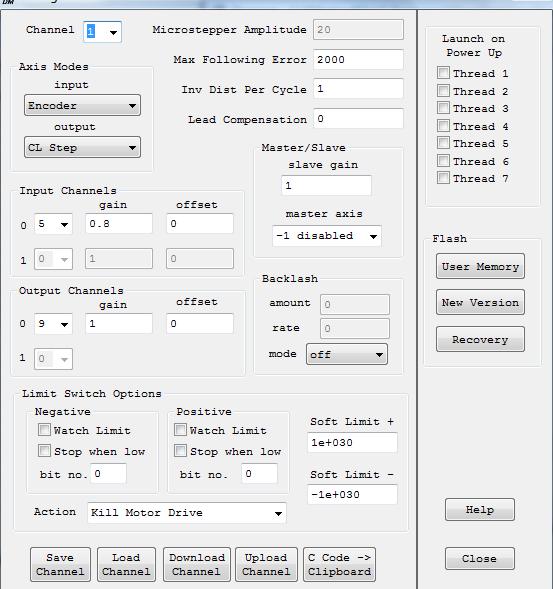
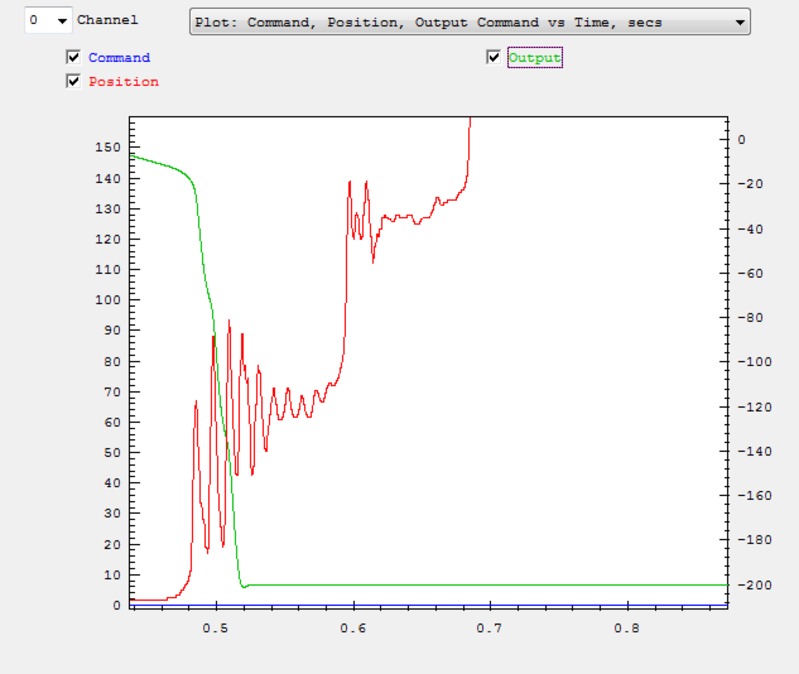
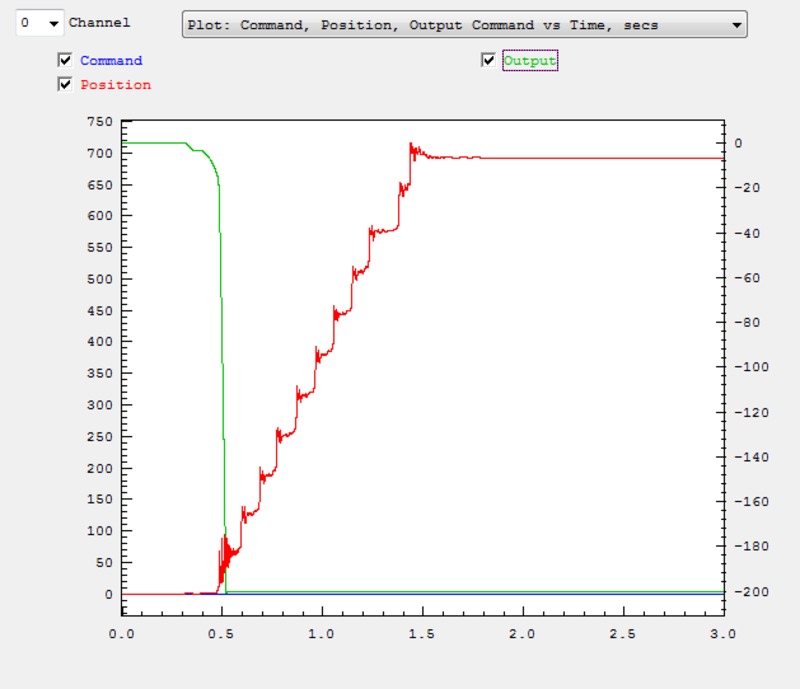
There are several inconsistencies in what you are showing us.  Your C Code shows settings for KFLOP Axis 0.  But the Step Response Plot is for KFLOP Axis Channel 1.  And the settings in the Screen are different from in the C Code.   Include a screen shot of your Config/Flash and Filters Screen.  Include a Plot of Command, Position, Output vs Time (or the raw data so we can plot however we want).

Regards
TK

Group: DynoMotion Message: 10051 From: Tom Kerekes Date: 8/27/2014
Subject: Re: KStep and Glass scales
Hi Moray,

That is correct.

Regards
TK

Group: DynoMotion Message: 10052 From: Moray Cuthill Date: 8/27/2014
Subject: Re: KStep and Glass scales
Ah yeah, I never checked to see what axis I had plotted. Both are set identical, with the exception of relevant input/output channels, and both giving a similar result in the step response screen, The values for the channel in the plot will vary from the C code, as I tried identical values to what's suggested in the Help for setting up closed loop steppers, but they made no difference so I never changed the values in my saved C file. It will be tomorrow before I get any more time to do any more testing.
 
I've attached the raw data, and the ch1/Y-axis code is further down.
The raw data is for a move of 0, with me manually turning the motor to see the response. I never saved anything from an actual move, as they looked very good with position held with typically less than 10 counts error.
The one bit I am baffled is where the filter settings have appeared from. However I've just checked, and they're from the original example file, so I have no idea what filter settings created them.
 
ch1->InputMode=ENCODER_MODE;
 ch1->OutputMode=CL_STEP_DIR_MODE;
 ch1->Vel=40000;
 ch1->Accel=200000;
 ch1->Jerk=4e+006;
 ch1->P=0;
 ch1->I=0.01;
 ch1->D=0;
 ch1->FFAccel=0;
 ch1->FFVel=0;
 ch1->MaxI=200;
 ch1->MaxErr=2000;
 ch1->MaxOutput=200;
 ch1->DeadBandGain=1;
 ch1->DeadBandRange=0;
 ch1->InputChan0=5;
 ch1->InputChan1=0;
 ch1->OutputChan0=9;
 ch1->OutputChan1=0;
 ch1->MasterAxis=-1;
 ch1->LimitSwitchOptions=0x100;
 ch1->LimitSwitchNegBit=0;
 ch1->LimitSwitchPosBit=0;
 ch1->SoftLimitPos=1e+030;
 ch1->SoftLimitNeg=-1e+030;
 ch1->InputGain0=0.8;
 ch1->InputGain1=1;
 ch1->InputOffset0=0;
 ch1->InputOffset1=0;
 ch1->OutputGain=1;
 ch1->OutputOffset=0;
 ch1->SlaveGain=1;
 ch1->BacklashMode=BACKLASH_OFF;
 ch1->BacklashAmount=0;
 ch1->BacklashRate=0;
 ch1->invDistPerCycle=1;
 ch1->Lead=0;
 ch1->MaxFollowingError=2000;
 ch1->StepperAmplitude=20;
 ch1->iir[0].B0=1;
 ch1->iir[0].B1=0;
 ch1->iir[0].B2=0;
 ch1->iir[0].A1=0;
 ch1->iir[0].A2=0;
 ch1->iir[1].B0=1;
 ch1->iir[1].B1=0;
 ch1->iir[1].B2=0;
 ch1->iir[1].A1=0;
 ch1->iir[1].A2=0;
 ch1->iir[2].B0=0.000769;
 ch1->iir[2].B1=0.001538;
 ch1->iir[2].B2=0.000769;
 ch1->iir[2].A1=1.92076;
 ch1->iir[2].A2=-0.923833;
 
 EnableAxisDest(1,0);
 
One thing I should probably mention is I'm still running 4.32a, as I still have the issue with probing not working in 4.33.
If I can get closed loop working properly, then I'll do some more testing to see why probing doesn't work when i upgrade to 4.33.
 
Thanks
Moray


On Wed, Aug 27, 2014 at 10:57 PM, Tom Kerekes tk@... [DynoMotion] <DynoMotion@yahoogroups.com> wrote:
 

Hi Moray,

There are several inconsistencies in what you are showing us.  Your C Code shows settings for KFLOP Axis 0.  But the Step Response Plot is for KFLOP Axis Channel 1.  And the settings in the Screen are different from in the C Code.   Include a screen shot of your Config/Flash and Filters Screen.  Include a Plot of Command, Position, Output vs Time (or the raw data so we can plot however we want).

Regards
TK

Group: DynoMotion Message: 10053 From: Tom Kerekes Date: 8/27/2014
Subject: Re: KStep and Glass scales [2 Attachments]
Hi Moray,

See the attachments it is very clear what is happening.  When a stepper motor's torque limit is exceeded it "miss-steps" and skips/loses a full motor pole which with KStep is 64 microsteps.  You still have a small MaxOutput and MaxI setting of 200 microsteps.  When you manually torque the motor it miss-steps to the next motor pole.  Then the closed loop quickly corrects it by making an output correction of 64 microsteps to reduce the error back toward zero.  After about 4 miss-steps it has corrected the maximum amount that it is allowed to correct (200 microsteps).  Forcing additional miss-steps cause the error to grow pole-by-pole in increments of 64 microsteps without any correction.

Regards
TK